
Every new Amazon seller asks the same question: "How much money do I actually need?"
You might see gurus claiming you can start with $500, while others insist you need $10,000. The truth sits somewhere in the middle, but finding that specific number is difficult. If you guess wrong, you risk running out of cash before your product even reaches the warehouse.
This guide provides a transparent Amazon product launch cost breakdown. We will look at real data, specific examples, and the tools that help you plan every dollar. No fluff, just the financial facts you need to launch safely.
The Real Price of Selling on Amazon
Many beginners focus only on the cost of the product. They find a supplier who sells a widget for $5, they plan to sell it for $20, and they assume they will pocket the difference.
That is not how Amazon FBA works.
Between the factory and your bank account, there are dozens of small expenses. Shipping, duties, photography, PPC (pay-per-click) advertising, storage fees, and returns all eat into your margin. If you do not account for these, you are not building a business; you are gambling.
A proper budget plan acts as your safety net. It tells you exactly how many units you can afford, how much you can spend on ads, and when you will turn a profit.
Why Accuracy Matters More Than Speed
Rushing to launch without a financial plan is the fastest way to fail.
When you underfund your launch, a few things happen:
- You run out of stock: You sell your initial inventory but lack the cash to buy more. Your ranking drops to zero while you wait for funds.
- You cannot afford ads: Your product lands on page 10 because you blew your entire budget on inventory and saved nothing for marketing.
- Unexpected fees kill you: A sudden storage fee hike or a higher-than-expected duty rate puts your account in the red.
You need a tool that looks at the current market, not outdated averages.
Review of 10xProfit Budget Planner
For this guide, we used 10xProfit to generate our data. This platform offers a specific Amazon Budget Planner that is distinct from generic spreadsheets.
Core Features
- 18+ Marketplaces: It works for Amazon.com, Amazon.co.uk, Amazon.de, and many others.
- Real-Time Data: It pulls current fee structures directly from Amazon, so you aren't using last year's rates.
- Category Specifics: It adjusts recommendations based on whether you are selling electronics, home goods, or automotive parts.
- 40+ Pro Tools: Beyond budgeting, it includes keyword research, competitor analysis, and profit calculators.
User Experience
The interface is clean and direct. You input your total available cash, and the system does the heavy lifting. It splits your capital into logical buckets so you can see exactly where every cent goes. It removes the need for complex Excel formulas that often break.
Step-by-Step Guide to Calculating Costs
Let’s walk through how to use the 10xProfit Budget Planner to build a reliable launch strategy. We will use a realistic scenario: a seller with $8,000 looking to launch an Electronics product on Amazon.com.
Step 1: Define Your Total Capital
Enter your total available funds. Be honest here. Do not include rent money or emergency savings. In our example, we input $8,000.
Step 2: Select Your Marketplace and Method
Choose your target country (e.g., USA) and your fulfillment method.
- FBA (Fulfillment by Amazon): Amazon handles shipping and customer service. This is the standard for most new sellers.
- FBM (Fulfillment by Merchant): You ship items yourself.
Step 3: Input Seller Details
Select "Individual Seller" or "Professional Seller."
- Tip: If you plan to sell more than 40 units a month, always choose Professional. It costs $39.99/month but saves you the $0.99 per-item fee.
Step 4: Analyze the Allocation
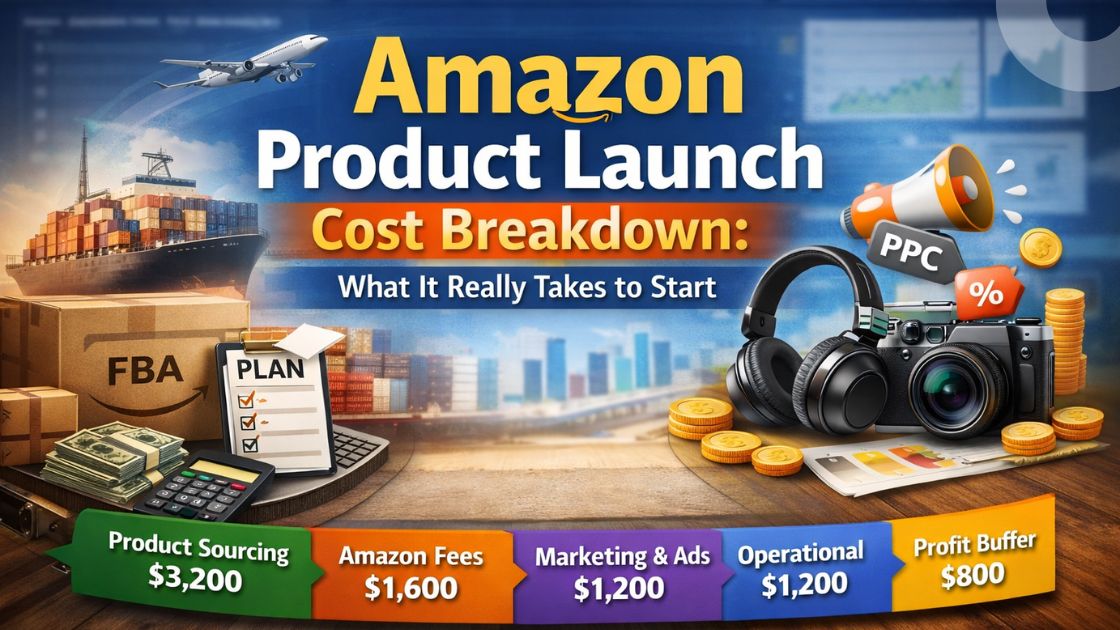
The tool generates a complete financial map. For our $8,000 electronics launch, here is the split:
- Product Sourcing: $3,200
- Amazon Fees: $1,600
- Marketing: $1,200
- Operational Costs: $1,200
- Profit Margin Buffer: $800
This immediate visibility prevents you from spending $6,000 on inventory and leaving nothing for the rest.
Detailed Expense Categories
Let’s look deeper at the specific line items in the Amazon product launch cost breakdown.
1. Product Sourcing (40%)
This is your inventory cost. For the electronics example, the target unit cost is $32.00. This buys you roughly 100 units.
- Why this limit? You must cap your inventory spend at 40% of your total budget. If you spend more, you starve your marketing budget.
2. Amazon Fees (20%)
These are mandatory platform costs.
- Referral Fee: The "commission" Amazon takes for finding you a customer (usually 15%).
- FBA Fee: The cost to pick, pack, and ship the box.
- Account Fee: The monthly subscription ($39.99).
3. Marketing & Ads (15%)
This is the most overlooked expense. You need $1,200 set aside for:
- Amazon PPC: Sponsored ads to appear at the top of search results.
- Vine Program: Getting initial reviews.
- Coupons: Discounts to encourage the first few sales.
4. Operational Costs (15%)
These are the invisible costs that surprise new sellers.
- Inbound Shipping: Getting goods from China (or elsewhere) to Amazon’s warehouse.
- Packaging: Custom boxes or inserts.
- Software: Tools like 10xProfit to track keywords and sales.
5. Profit Margin Buffer (10%)
This $800 is your emergency fund. It covers returns, damaged goods, or exchange rate fluctuations. Never spend this on inventory.
Practical Tips for Reducing Launch Costs
If $8,000 sounds too high, you can lower your entry point by choosing a different niche.
Choose a Lower-Cost Market
Using the 10xProfit Niche Finder, we analyzed a different product: Streak-free glass cleaner.
- Startup Cost: ~$2,500
- Avg Product Price: $24.99
- Search Volume: 5.4K/month
By picking a simpler product (fluids/home goods) instead of electronics, you lower the risk. Electronics have high returns and high unit costs. Simple consumables often have repeat buyers and lower manufacturing costs.
Use Human-Generated Content
Don't waste money on expensive agencies for your blog or listing copy initially. Write clear, benefit-driven text yourself or use cost-effective tools that produce 100% human-readable content.
Start with a "Test Batch"
Instead of ordering 1,000 units, order the minimum amount your supplier allows (MOQ). The budget planner suggested 100 units for the electronics launch. This minimizes risk if the product doesn't sell.
Comparison: Manual vs Automated Planning
Is it worth using a tool like 10xProfit over a free spreadsheet?
| Feature | Manual Spreadsheet | 10xProfit Budget Planner |
| Data Source | You search Google for fees | Real-time API data from Amazon |
| Fee Accuracy | Often outdated | Always current |
| Time Required | Hours to build and verify | Seconds to generate |
| Scenario Testing | Difficult to change variables | Instant recalculation |
| Marketplace Support | Usually just one country | 18+ Global Marketplaces |
| Risk Assessment | None | Visual allocation of funds |
Common Mistakes That Drain Your Bank Account
Even with a good plan, sellers make errors. Avoid these three traps.
1. Ignoring the "Marketing Tax"
Many sellers believe a good product sells itself. It does not. In 2026, organic reach is low for new products. You must pay for visibility. If you skip the 15% marketing allocation, your inventory will sit stagnant.
2. Underestimating Returns
In the electronics example, we set a high price multiplier (3.5x to 5x) because electronics break. Customers return them. If your margin is too thin, one return can wipe out the profit from three sales.
3. Forgetting Storage Fees
Amazon charges you for the space your boxes take up. If you order 500 units and they don't sell fast, monthly storage fees will bleed your account dry. Stick to the recommended stock quantity (e.g., 100 units) for your first order.
FAQ
1. What is the minimum budget for an Amazon FBA launch?
For a safe launch, plan for at least $2,500 for simple products (like the glass cleaner example). For complex categories like electronics, $8,000 or more is recommended.
2. How much does Amazon product research software cost?
Most tools charge a monthly subscription. 10xProfit offers a free trial and includes 40+ tools, making it a cost-effective choice for new sellers.
3. What is the "honeymoon period" on Amazon?
This is the first 2-4 weeks after launch where Amazon's algorithm gives your product extra visibility. Having your marketing budget ready for this period is critical.
4. Should I budget for a trademark?
Yes, if you want Brand Registry. It costs roughly $250-$500 depending on the service you use, but it protects your listing from hijackers.
5. How do I calculate my profit margin accurately?
Take your sale price and subtract: Product Cost, Shipping, Referral Fee, FBA Fee, and Ad Spend. 10xProfit has a calculator that does this automatically.
6. Is FBM cheaper than FBA to start?
It can be, because you avoid FBA fees. However, you must pay for your own shipping labels and boxes. FBA usually offers higher conversion rates because customers want Prime shipping.
7. How much should I spend on PPC daily?
Start with $20-$50 per day. Monitor it closely. If you see sales, increase it. If not, adjust your keywords.
8. Do I need business insurance to start?
Amazon requires insurance once you hit $10,000 in sales in a month. You can usually wait until you reach that milestone.
9. What are "hidden" costs I might miss?
Barcodes (GS1), sample costs (shipping a prototype from China), and quality inspection services are often forgotten in rough drafts.
10. Can I launch with a credit card?
You can, but it adds risk. Interest rates can eat your margin. It is safer to use cash capital you have saved.
Start Your Budget Plan Today
An Amazon product launch cost breakdown is not just a list of numbers; it is your business plan. It tells you what you can afford, what you should sell, and how you will grow.
Don't let financial anxiety stop you. Use the right data to make smart decisions. Whether you are looking at a $2,500 entry into automotive care or an $8,000 investment in electronics, the math must work before you spend a dime.
Ready to see your real numbers?
Use the 10xProfit Budget Planner to build your personalized roadmap. It is fast, accurate, and requires no credit card to start.
[Start Free Trial]